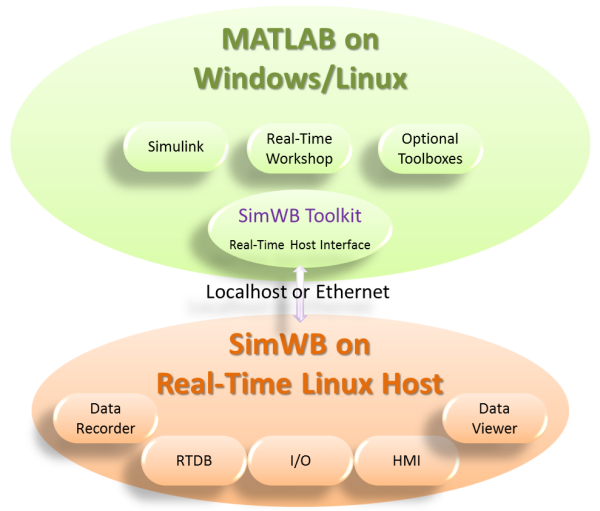
SIMulation Workbench™ (SimWB) provides a framework that enables the cyclic execution of simulation models in real-time. It includes the ability to connect the inputs and outputs of the models with external hardware and to interact with the model signals and parameters via program and operator interfaces. SimWB is based on Concurrent's Frequency-Based Scheduler (FBS) and fully supports multiprocessor architectures.
SimWB's graphical user interface (GUI) provides a powerful and intuitive point-and-click style of operation that allows you to develop and execute real-time hardware-in-the-loop and man-in-the-loop simulations with ease. The GUI allows you to conveniently configure, start, stop, record and play back simulation runs. It provides fast, direct shared memory access to all parameters and signals needed by your simulation. The in-memory design optimizes performance and data conversion speed.
A real-time host provides the run-time environment for simulation while network-based GUI clients control and display simulation activities. Real-time performance is maximized because the GUI clients run outside the real-time host.
At the heart of SimWB is the memory-resident database called the Real-Time Database(RTDB) which can be accessed by all simulator processes. The RTDB stores the definition of all data items used by the simulation such as model variables and their mapping to I/O boards and model parameters. The RTDB is configured externally via the Configurator GUI and provides for complete I/O independence. All the information necessary to configure I/O points and data bus protocols and to read, convert, write, and store simulation variables are maintained in the database. If I/O points need to be reassigned, the Control Center provides convenient and model-independent remapping.
The RTDB variable can be viewed, plotted, and modified in real-time using the Real-Time Viewer.
The Data Recorder tool allows simulation data points to be logged individually and independently at the rate they are produced. Hardware and engineering values, as well as run-time flags and time stamps, are also recorded. Recorded test sessions can also be replayed back on the system.