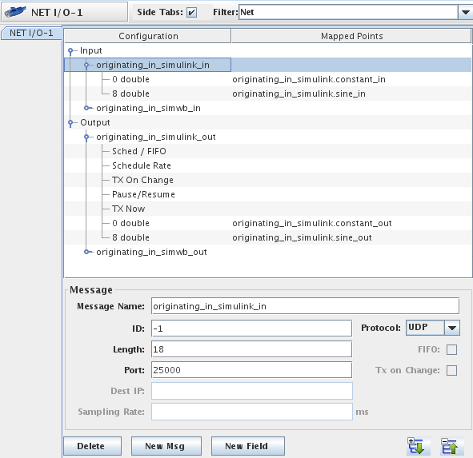
Figure 1: I/O Mapping for NET-IO device depicting a message being received from Simulink® into SimWB.
This example shows how to send data back and forth between a running Simulink model and a SimWB test session running on the real-time host. This can be useful to update variables in Simulink based on the value of variables calculated via the scripts and models running in SimWB and vice versa. For example, you can drive animation in Simulink® based on the state of the system being simulated in the test session running on the real-time host.
Use the NET-IO I/O device in SimWB to send/receive UDP (or TCP) data from the real-time host. Map the relevant RTDB variables to field in Input/Output messages.
Figure 1: I/O Mapping for NET-IO device depicting a message being received from Simulink® into SimWB.
Use the From_SimWB_Host and To_SimWB_Host
blocks from the simwbUDPBlocklib library to send/receive
UDP data from the Simulink model.
UDP communication is supported by both fixed-step and variable-step models.
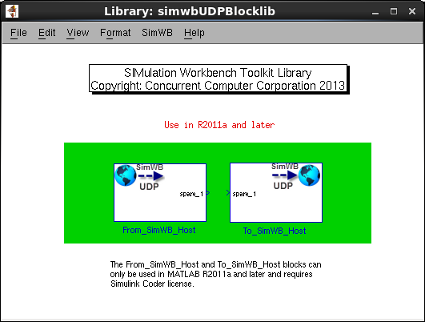
Figure 2: From_SimWB_Host and To_SimWB_Host in the
simwbUDPBlocklib library.
UDP communication can introduce nondeterministic behavior in a real-time test. Therefore, for tests where real-time considerations are important, ideally, UDP communication should be reserved for slow-changing and non-real-time-critical variables. You must analyze the reliability of your UDP channel and determine the merits of the tradeoff and accordingly specify transmission/receive rates.
The following factors contribute to the lack of determinism in UDP communication between the real-time host and a Simulink instance:
This example comprises the ccur_udp Simulink model and the
udp_example RTDB and Test.
The following diagrams depict the flow of data between the Simulink model and the SimWB test.
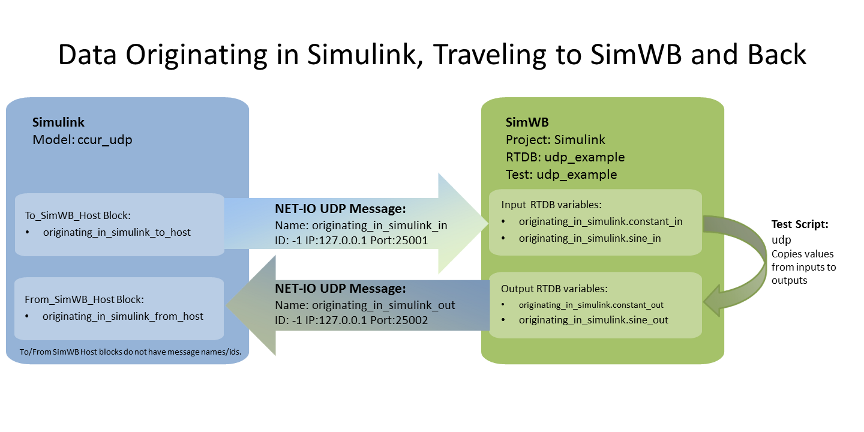
Figure 3: Details of how data is sent from the Simulink model to SimWB and routed back to the Simulink
model.
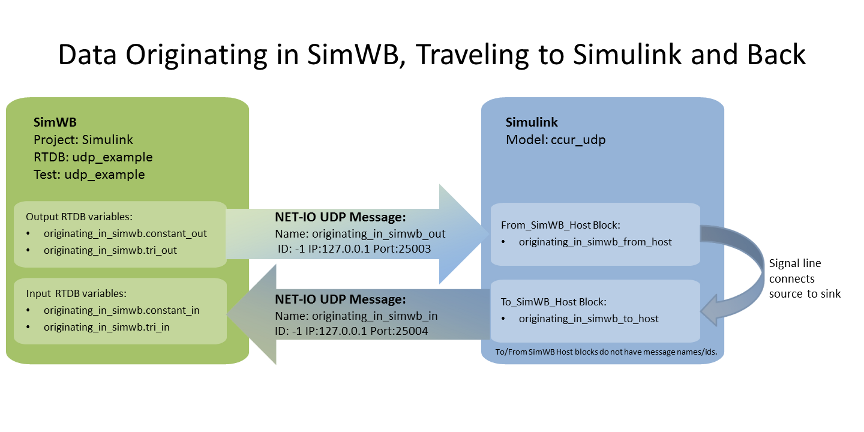
Figure 4: Details of how data is sent from SimWB to the Simulink model and routed back to SimWB.
To run this example, perform the following steps on the real-time host machine:
lsof -i :25001-25004
ccur_udp Simulink® model in a MATLAB®
installation on the real-time host that is running SimWB.
The SimWB UDP communication blocks are supported in MATLAB R2011a and subsequent releases.
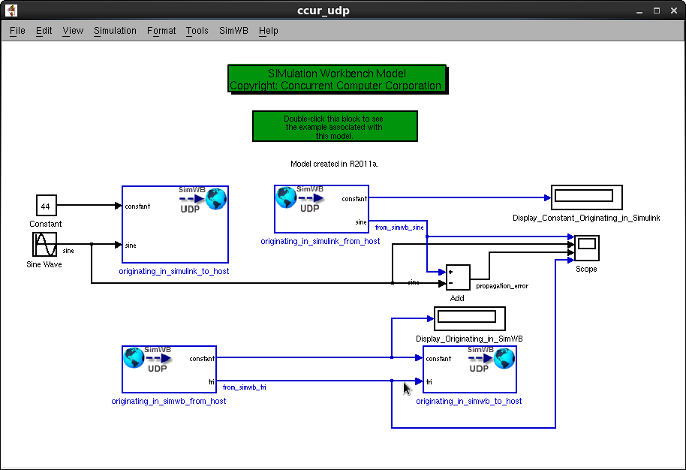
Figure 5: Simulink model: ccur_udp.
The following blocks are instances of the SimWB UDP communication blocks. Double-click the blocks for configuration information.
udp_example Test.
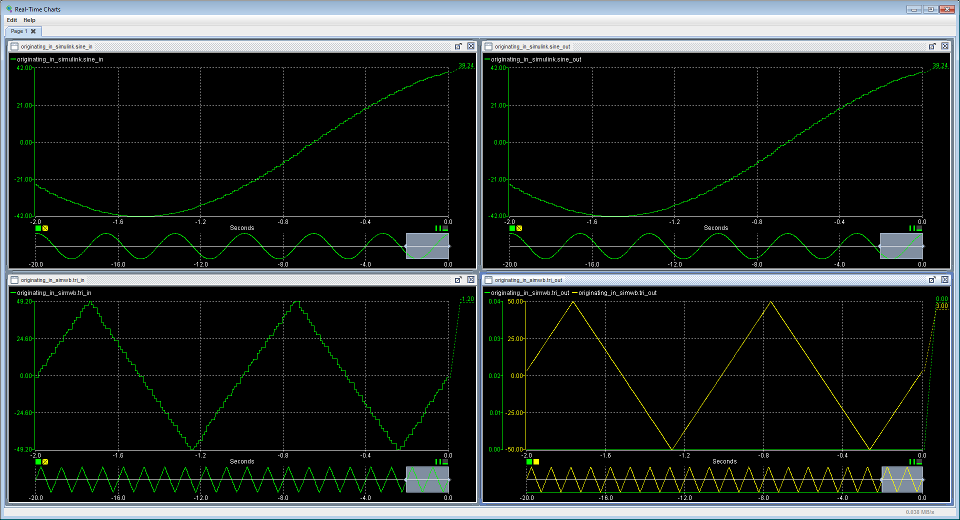
Figure 6: Sine and triangular wave travelling between Simulink and SimWB, seen in an RT-Viewer
Chart.
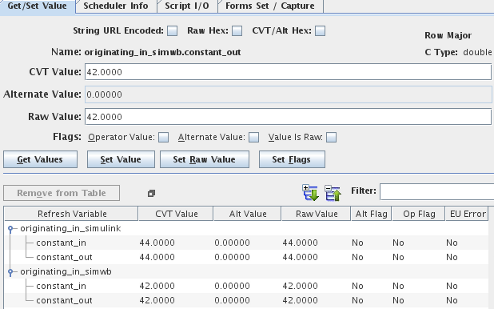
Figure 7: Constant values travelling between Simulink and SimWB, seen in an RT-Viewer Table.
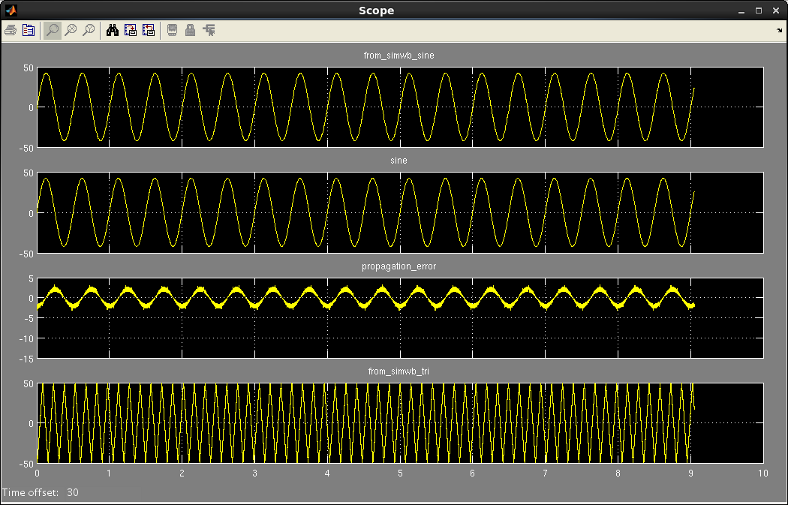
Figure 8: Sine and triangular wave travelling between Simulink and SimWB, seen in a Simulink
Scope
The sine wave emitted by Simulink® travels to SimWB and then returns
to Simulink, leading to a 1-frame delay at a minimum, in addition
to any network propagation issues and other delays.
This lag is reflected in the non-zero difference between the sine
signal (original Simulink source signal) and the
from_simwb_sine signal.
Suppose you want to run the Simulink® model from a different machine. Assume the Simulink model machine IP address is IP_Simulink and the SimWB real-time host machine IP address is IP_SimWB. The port numbers for the four UDP messages are indicated by PORT_message_name.
Change the following values to ensure proper data propagation:
ccur_udp:
Remote IP address parameter to IP_SimWBRemote IP port parameter to PORT_originating_in_simulink_inRemote IP address parameter to IP_SimWBRemote IP port parameter to PORT_originating_in_simwb_inLocal IP address parameter to IP_SimulinkLocal IP port parameter to PORT_originating_in_simulink_outRemote IP address parameter to IP_SimWBLocal IP address parameter to IP_SimulinkLocal IP port parameter to PORT_originating_in_simwb_outRemote IP address parameter to IP_SimWBudp_example RTDB loaded:
originating_in_simulink_in
message, set the Port parameter to
PORT_originating_in_simulink_in
originating_in_simwb_in
message, set the Port parameter to
PORT_originating_in_simwb_in
originating_in_simulink_out
message, set the:
originating_in_simwb_out
message, set the:
ccur_udp.Simulink project on the
SimWB real-time host machine:
udp_exampleudp_exampleudp_example_scriptSimulink®, developed by MathWorks, is a graphical modeling environment.