Running Simulink® Models with OpenMP® Code in SimWB
OpenMP API allows users to leverage multicore processing using supported compiler directives,
library routines, and environment variables.
If a given Simulink model contains OpenMP directives,
users can utilize the SimWB built-in support for OpenMP to execute these models.
For example, Dymola® automatically generates Simulink S-Functions that use OpenMP.
SimWB supports OpenMP in Simulink models, offering several advantages for Hardware-In-the-Loop (HIL)
simulation, such as:
-
Best in class computing horsepower
SimWB is designed from the ground up for multicore execution. SimWB allows users to partition big,
complex, and computationally intensive models into smaller parts and execute them on different
processors. This opens up numerous possibilities and enables customers to effectively utilize modern
multiprocessor systems. Dymola's automatic partitioning of models with OpenMP makes running complex
models in SimWB effortless.
-
Optimized for Real-Time
SimWB optimizes the initialization of OpenMP threads, greatly improving the real-time performance
of these threads.
-
Scalable
Large monolithic models result in significant computational costs.
With OpenMP, more complex models can be executed in real-time, overcoming scalability challenges.
Supported Dymola versions for OpenMP
- Dymola 2016
- Dymola 2017
- Dymola 2018
Configuring the models for OpenMP support
-
When generating code from a Simulink model that contains OpenMP S-Functions from Dymola,
please ensure to edit the 'Compiler Options'
in the 'Code Generator' tab of the MLToolkit GUI.
Set the following additional parameters:
-
-DOMP_SIMWB -DNUM_THREADS=4 -DDYM2CCUR -DOMP_DYMOLA -fopenmp -I/path/to/Dymola/source/files
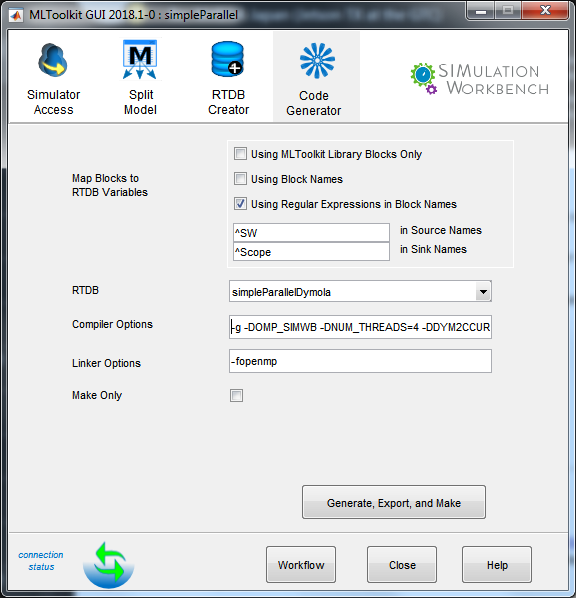
- Edit the Linker Options and set the following parameters:
-
The number of the threads above can be modified as required by changing -DNUM_THREADS=4.
-
Additionally, it is imperative to include the path to the Dymola source files in the SimWB server
system using the '-I' option.

When running OpenMP models in SimWB, make sure to run the OpenMP threads on dedicated cores
and that nothing else is running on those cores.
Also, it will be a good idea to run all the OpenMP threads on the same CPU.
In other words, make sure the cores that run the OpenMP threads are in the same CPU.